clood

Clood CBR: Towards Microservices Oriented Case-Based Reasoning


🚀 Version 2 Released!
What is Clood?
(its Cloud in Scottish dialect)
Case-based Reasoning (CBR) applications have been widely deployed across various sectors, including pharmaceuticals, defense, aerospace, IoT, transportation, poetry, and music generation. However, a significant proportion of these applications have been developed using monolithic architectures, which present size and complexity constraints. Consequently, these applications face barriers to the adoption of new technologies, and changes in frameworks or languages directly impact them, making them prohibitively expensive in terms of time and cost. To tackle this challenge, we have developed Clood CBR, a distributed and highly scalable generic CBR system based on a microservices architecture. By splitting the application into smaller, interconnected services, Clood CBR can scale to meet varying demands. Microservices are cloud-native architectures that have become increasingly popular with the rapid adoption of cloud computing. Therefore, the CBR community can benefit from a framework such as Clood CBR at this opportune time.
CloodCBR Paper Published at ICCBR 2020 📄
CloodCBR Presentation and Demo from ICCBR 2020 ▶️
Adapting Semantic Similarity Methods for Case-Based Reasoning in the Cloud from ICCBR 2022 📄
Cite CloodCBR
@inproceedings{cloodcbr,
  title={Clood CBR: Towards Microservices Oriented Case-Based Reasoning},
  author={Nkisi-Orji, Ikechukwu and Wiratunga, Nirmalie and Palihawadana, Chamath and Recio-Garc{\'\i}a, Juan A and Corsar, David},
  booktitle={International Conference on Case-Based Reasoning},
  pages={129--143},
  year={2020},
  organization={Springer}
}
What’s new in Clood CBR Version 2
Core Updates
- Semantic SBERT
- Angle Embeddings
- Explanation API - Extracts the field names and local similarity values from explanations.
- Minor normalisation fixes (e.g. mcsherry, inerca)
- Array datatype functionality
- Complete docker support
- JWT Token based API authentication
Dashboard Updates
- Login Authentication support
- Visual case representation (Parallel Cordinates)
- Export functionality for retrievals
- Import CSV validation and templating
- Add single cases from dashboard support
- Explanations added for similarity types
- Manage JWT Tokens
Available Similarity Metrics
| Data type | Similarity metric | Description |
|---|---|---|
| All | Equal | Similarity based on exact match (used as a filter) |
| String | EqualIgnoreCase | Case-insensitive string matching |
| BM25 | TF-IDF-like similarity based on Okapi BM25 ranking function | |
| Semantic USE | Similarity measure based on word embedding vector representations using Universal Sentence Encoder (optional) | |
| Semantic SBERT | Similarity measure based on word embedding vector representations using SBERT (optional) | |
| Angle | Similarity measure based on matching / retrieval word embedding vector representations using AnglE (optional) | |
| Numeric | Interval | Similarity between numbers in an interval |
| INRECA | Similarities using INRECA More is Better and Less is Better algorithms | |
| McSherry | Similarities using McSherry More is Better and Less is Better algorithms | |
| Nearest Number | Similarity between numbers using a linear decay function | |
| Categorical | EnumDistance | Similarity of values based on relative positions in an enumeration |
| Table | User-defined similarity between entries of a finite set of domain values | |
| Date | Nearest Date | Similarity between dates using a decay function |
| Array | Jaccard | Similarity of two sets by dividing the size of their intersection by the size of their union. |
| Array SBERT | For array based string representation with SBERT (optional) | |
| Query Intersection | Measures how much of the query set is covered by each case set | |
| Cosine | Cosine similarity between vectors | |
| Location | Nearest Location | Similarity based on separation distance of geo-coordinates using a decay function |
| Ontology | Path-based | Similarity using Wu & Palmer path-based algorithm (optional) |
| Feature-based | Similarity using Sanchez et al. feature-based algorithm (optional) |
Start Using Clood? 🚀
Local Development
We have simplified the entire CloodCBR development environment. You can easily start developing Clood CBR using the containarised environment now. Make sure you have Docker installed.
Once cloned this repo you just have to run the following commands
- Clone/Download the repo
- Build the docker image and run
Minimal Stack
docker compose --env-file .env.dev up --build
Does not include support for Semantic USE, Semantic SBERT, AnglE and Ontology similarities.
Full Stack
docker compose --profile other --env-file .env.dev up --build
- Please note that the docker build might take a bit longer depending on the internet speed (5-20mins)
- The above command uses default configuration from .env.dev, when moving to proudction make sure to change config files inside
api/config.py,dashboard/app/env.jsand other services (if using them).
-
Open Clood CBR dashboard at http://localhost:8000/ using default username and password (
clood:clood) -
Start Using! Create a new project, configure, load and query cases.
Development Ports
- CloodCBR Dashboard - http://localhost:8000/
- CloodCBR API - http://localhost:3000/
- Clood USE Vectoriser API - http://localhost:4100/
- Clood Ontology Similarity API - http://localhost:4200/
- Clood SBERT Vectoriser API - http://localhost:4300/
- Clood Angle Vectoriser API - http://localhost:4400/
- OpenSearch Dashboard - http://localhost:5601/
- OpenSearch API - http://localhost:9200/
Project Components
Implementation Architecture
🚧 We are currently improving this section
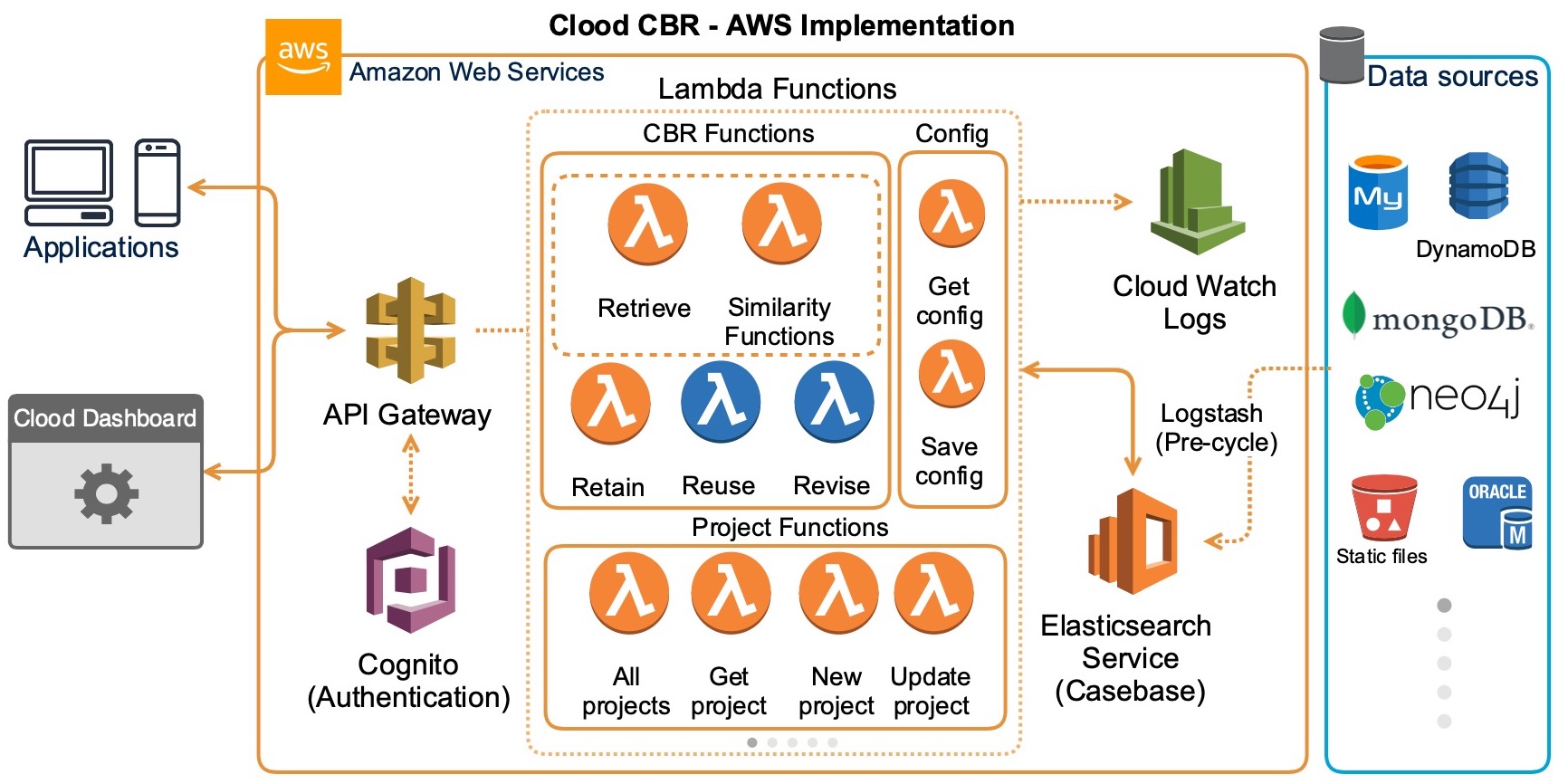
Clood Structure and Technologies
- Serverless Functions - REST API for communication from client apps (Serverless Framework with Python functions)
- Client - This is the demonstration dashboard (AngularJS)
- Elasticsearch - Managed ES service used as casebase
Serverless Functions
Project is available in the serverless-functions folder of the repository.
Elasticsearch
For the Clood implementation we have used AWS Elasticsearch service.
API endpoints
| End-point | Request Method | Description |
|---|---|---|
| /auth | HTTP POST | Authenticates a dashboard/API user and returns a JWT |
| / | HTTP GET | API reachability check |
| /project | HTTP GET | Retrieves all the CBR projects |
| /project/{id} | HTTP GET | Retrieves a specific CBR project with specified id |
| /project | HTTP POST | Creates a new CBR project. The details of the project are included as a JSON object in the request body |
| /project/{id} | HTTP PUT | Updates the details of a CBR project. Modifications are included as a JSON object in the request body |
| /project/{id} | HTTP DELETE | Removes a CBR project with specified id |
| /project/mapping/{id} | HTTP GET | Creates the OpenSearch casebase mapping for a project |
| /case/{id}/list | HTTP POST | Bulk addition of cases to the casebase of the project with specified id. Cases are included in the request body as an array of objects |
| /case | HTTP POST | Retrieves cases from a project casebase |
| /project/{id}/case/{cid} | HTTP GET | Retrieves a specific case from a project casebase |
| /project/{id}/case/{cid} | HTTP PUT | Updates a specific case in a project casebase |
| /project/{id}/case | HTTP DELETE | Deletes a project’s casebase |
| /project/{id}/case/{cid} | HTTP DELETE | Deletes a specific case from a project casebase |
| /retrieve | HTTP POST | Performs the case retrieve task (see retrieve section below) |
| /reuse | HTTP POST | Performs reuse/adaptation based on specified logic (see reuse section below) |
| /revise | HTTP POST | Performs the case revise task |
| /retain | HTTP POST | Performs the case retain task |
| /rag | HTTP POST | Performs the CBR-RAG task by retrieving similar cases and using the configured LLM to generate a new case (see CBR-RAG section below) |
| /explain | HTTP POST | Extracts explanation details from a retrieval explanation |
| /project/{id}/options | HTTP POST | Updates project attribute options from stored case values |
| /project/{id}/suggest-config | HTTP POST | Suggests project attribute configuration from uploaded data profiles, with rule-based inference and optional LLM enrichment |
| /config | HTTP GET | Retrieves the system configuration |
| /config | HTTP POST | Adds or updates the system configuration |
| /config/create | HTTP GET | Recreates the global system configuration |
| /llm/config | HTTP GET | Retrieves non-secret LLM configuration metadata, such as provider, model, and configured status |
| /ontology_sim/{ontology_id} | HTTP GET | Checks whether ontology similarity data exists for an ontology |
| /token | HTTP GET | Retrieves all saved API access tokens |
| /token | HTTP POST | Creates a new API access token |
| /token/{id} | HTTP DELETE | Deletes a saved API access token |
Notes:
- Base URL: default local API URL is
http://localhost:3000/.
Using the API — retrieve
The /retrieve endpoint performs the Retrieve step of the CBR cycle. It takes a query case as a list of query features, matches it against the selected project casebase using the configured similarity measures, and returns the top matching cases.
Request body:
data: The query case used for retrieval. This is a list of query feature objects. In each feature object:nameis the attribute namevalueis the value for that attribute
projectId: Project ID to retrieve againstproject: Optional full project object. If supplied, it is used instead ofprojectIdtopk: Optional number of cases to retrieve. Default:5explanation: Optional boolean. Iftrue, includes retrieval explanation details for each case inbestKfeedback: Optional boolean. Iftrue, includes feedback details for each case inbestKglobalSim: Optional global similarity setting. Default:Weighted Sum. The current implementation usesWeighted Sumto aggregate local similarities by default, and other global similarity options are not yet included. This field is retained for future support of additional aggregation strategies.
Query feature fields:
name: Attribute name to query onvalue: Query value for that attributesimilarity: Optional similarity metric to use for that attributetype: Optional attribute typeweight: Optional attribute weightstrategy: Optional reuse strategy for query features marked as unknown. Supported values includeNN value,Maximum,Minimum,Mean,Median,Mode,Majority, andMinority.filterTerm: Optional filter operator if the field is to be treated as a filter (instead of using similarity measure)filterValue: Optional filter comparison value
Notes:
- If
projectis not supplied,projectIdis used to load the project - If a query feature does not specify
similarity,type, orweight, the endpoint uses the values defined in the project attributes - If no valid query features are provided, the endpoint falls back to returning cases using a match-all query
- Retrieved cases are returned as normal case objects, with
score__added to each result - If
explanationis enabled, each retrieved case includesmatch_explanation - If
feedbackis enabled, each retrieved case includesfeedback
Below is a minimal example showing how to call the /retrieve endpoint to perform a case retrieval. Replace http://localhost:3000 with your API base URL and provide a valid JWT in the Authorization header if your deployment requires it.
curl -X POST "http://localhost:3000/dev/retrieve" \
  -H "Content-Type: application/json" \
  -H "Authorization: Bearer <jwt_token>" \
  -d '{
    "data": [
      {
        "name": "symptom",
        "value": "fever"
      },
      {
        "name": "age",
        "value": 35
      }
    ],
    "projectId": "<project_id>"
  }'
Example (simplified) response:
{
    "recommended": {
        "symptom": "fever",
        "age": 35,
        "...": "...",
        "condition": "Common cold"
    },
    "bestK": [
        {
            "symptom": "fever",
            "age": 33,
            "...": "...",
            "condition": "Flu",
            "score__": 0.852363
        },
        {
            "symptom": "headache",
            "age": 35,
            "...": "...",
            "condition": "Migraine",
            "score__": 0.5228514
        }
    ]
}
- Auth: include
Authorization: Bearer <JWT_TOKEN>when JWT authentication is enabled (enabled by default).
Response fields:
recommended: The recommended case produced from the retrieved results. It is based on the top-ranked retrieved case, then updated using known query values and any reusestrategyspecified for unknown values.bestK: The top matching retrieved casesretrieveTime: Total end-to-end time for the retrieve stepesTime: Elasticsearch/OpenSearch query time in milliseconds
Using the API — reuse
The /reuse endpoint completes the Reuse step of the CBR cycle. It supports custom reuse logic.
How it works:
- A user can provide a custom reuse script in
api/cbrcycle/custom_reuse_scripts - The script file name must begin with
_, for example_my_reuse.py - The request body should include
reuse_typewith the script name, for example"_my_reuse" - Clood loads that script and executes its
reuse(...)function - The endpoint returns whatever result the custom reuse script produces
This allows users to define any reuse or adaptation logic they need for their domain, while keeping the /reuse endpoint unchanged.
Example request:
curl -X POST "http://localhost:3000/dev/reuse" \
  -H "Content-Type: application/json" \
  -H "Authorization: Bearer <jwt_token>" \
  -d '{
    "reuse_type": "_my_reuse",
    "query_case": {},
    "neighbours": []
  }'
🚧 We are currently improving this section
CBR-RAG
Clood also supports CBR-RAG through the /rag endpoint. This combines case retrieval with LLM-based generation by using the retrieved cases and project attribute specification to complete a query case.
Using the API — rag
The /rag endpoint performs retrieval plus generation. It retrieves the top matching cases for a query case, builds a prompt from the query features, retrieved cases, and project’s attribute specification, then calls the configured LLM to generate a new case.
LLM provider configuration:
These can be set through environment variables, for example in .env.dev for local Docker development.
- The backend selects the provider from
CLOOD_LLM_PROVIDER - Supported values:
openai,ollama,anthropic,huggingface - Related configuration includes
CLOOD_LLM_API_KEY,CLOOD_LLM_API_URL,CLOOD_LLM_MODEL, andCLOOD_CBR_RAG_PROMPT
Request body:
The /rag endpoint reuses the same retrieval input structure as /retrieve, then augments it with LLM-specific generation options.
- Retrieval-related request fields follow the same structure as
/retrieve, includingdata,projectId/project,topk,explanation, andfeedback max_tokens: Optional maximum token count passed to the LLM. Default:1024include_reasoning: Optional boolean. Iftrue, asks the LLM to return a concise evidence-based reasoning object alongside the generated caseprompt_template: Optional template override for the RAG promptprompt: Optional full prompt override
Prompt template placeholders:
{query_case}{cases}{attributes}
Notes:
- Retrieved cases are passed to the LLM as standard case objects using
attribute_name: attribute_value - The generated solution is expected to use the same case-object structure as the retrieved cases
- The generated solution should be influenced by the retrieved cases and follow the project attribute specification
- A valid
prompt_templatemust include{query_case},{cases}, and{attributes} - If
promptis supplied, it overridesprompt_template
Example request:
curl -X POST "http://localhost:3000/dev/rag" \
  -H "Content-Type: application/json" \
  -H "Authorization: Bearer <jwt_token>" \
  -d '{
    "projectId": "<project_id>",
    "topk": 3,
    "include_reasoning": true,
    "data": [
      {
        "name": "symptom",
        "value": "fever",
        "weight": 1,
        "similarity": "BM25"
      },
      {
        "name": "age",
        "value": 35,
        "weight": 1,
        "similarity": "Nearest Number"
      }
    ]
  }'
Example response:
{
  "bestK": [
    {
      "symptom": "fever",
      "age": 33,
      "condition": "Flu",
      "score__": 0.852363
    },
    ...
  ],
  "generatedCase": {
    "symptom": "fever",
    "age": 35,
    "condition": "Common cold"
  },
  "reasoning": {
    "summary": "The generated case is based on the best-matching retrieved cases and reflects their strongest shared patterns, including a similar age range."
  },
  "ragTime": 1.284,
  "esTime": 18
}
Response fields:
bestK: The top matching retrieved casesgeneratedCase: The new case generated by the LLMreasoning: Present wheninclude_reasoningis enabled and the LLM returns itragTime: Total retrieval-plus-generation timeesTime: Elasticsearch/OpenSearch query time in milliseconds
Client Dashboard
The Client Dashboard demonstrates the use of Clood through API calls to create and configure projects and perform CBR tasks. Project is available in the dashboard folder of the repository. The readme at dashboard describes how to install the client dashboard.
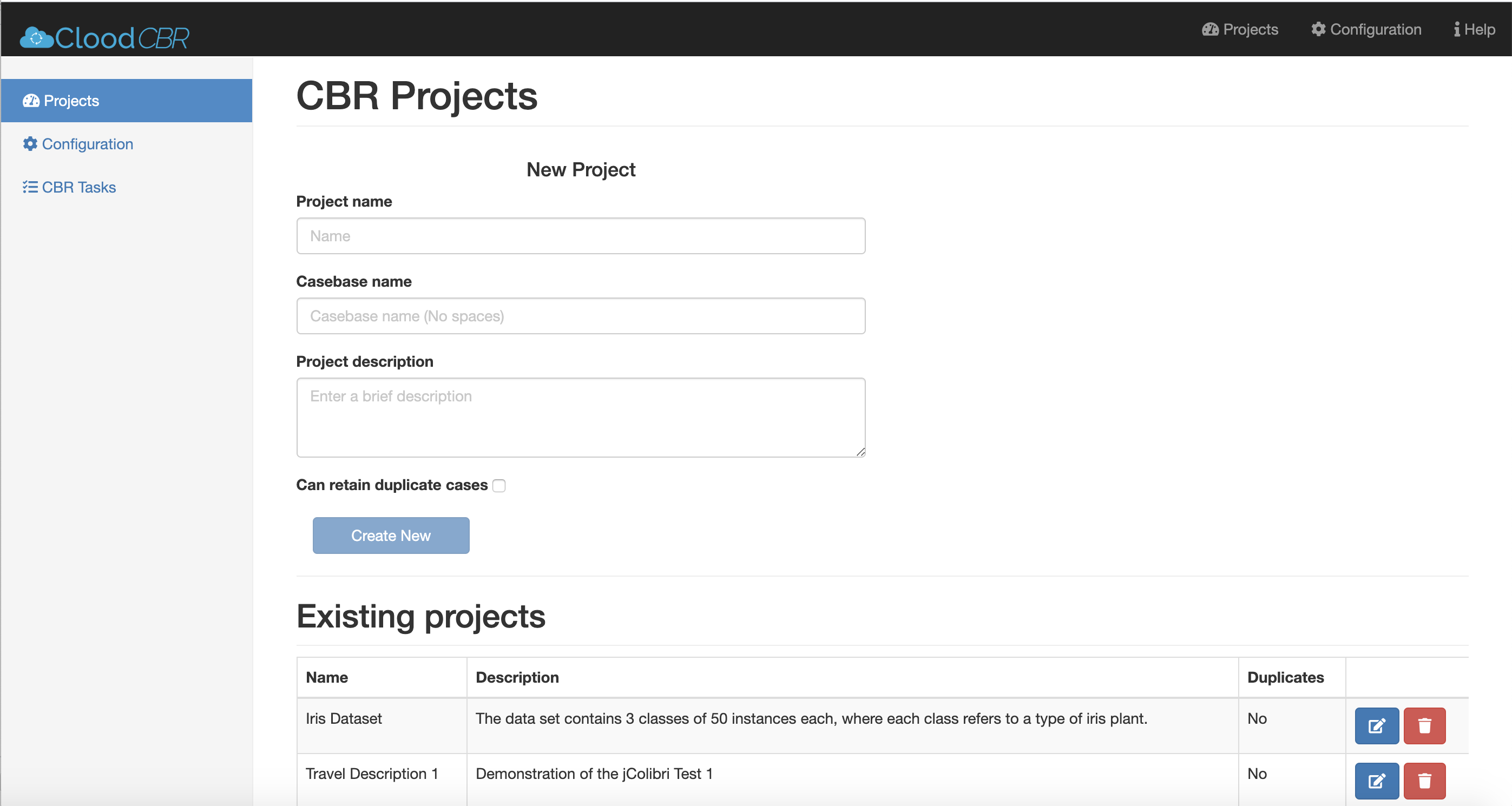
Guide to install and use the Clood Dashboard is available in the /dashboard folder. Clood Dashboard
🚧 We are currently improving this section
Deployment Guide
OpenSearch (Formerly ElasticSearch in AWS)
Follow the guide Here on getting started with Elasticsearch in AWS. All you need next is the ES url and the AWS access keys.
Serverless functions (API)
We have built Clood with the serverless framework which is a used deploy and test serverless apps across different cloud providers. The example installation here will be for AWS.
-
Make sure you have installed and setup serverless framework globally. Guide
- Install Dependenices from CLI
npm install -
Update the serverless.yml file as required. (Eg. region, service name..)
- Add a conf.py file with the following structure
aws = {
    "host": 'CLOUDSEARCH AWS URL', # domain.eu-west-1.es.amazonaws.com
    "region": 'eu-west-1',
    "access_key":   '',
    "secret_key": ''
}
- Simply deploy now, it will package and run in CLI
serverless deploy
- Make sure that docker is running in your computer when deploying (it is required to package the python dependencies)
License
Clood CBR: Towards Microservices Oriented Case-Based Reasoning by Nkisi-Orji, Ikechukwu; Wiratunga, Nirmalie; Palihawadana, Chamath; Recio-García, Juan A.; Corsar, David; Robert Gordon University Aberdeen is licensed under Attribution 4.0 International

Repo Maintained by Ikechukwu Nkisi-Orji (RGU) and Chamath Palihawadana.